

Changelog Description Summary Product Sheets MSPA Download Examples
2025/05:
- GTB 3.306 is out, more details in the changelog
2025/03:
- GTB 3.305 is out, more details in the changelog
- updated fragmentation productsheet with new change scheme
- GWB 1.9.8 is out, more details in the changelog
- working on connectivity change analysis
2025/02:
- GWB 1.9.7 is out, more details in the changelog
2024/12:
- GWB 1.9.6 is out, more details in the changelog
2024/10:
- new public Docker Hub image by K. Riitters (see Docker section in GTB installation)
- GTB/GWB are now also available as docker images
- Check out the new training material under Help -> GTB Training
2024/09:
- GTB 3.3 Revision 4 is out, more details in the changelog
2024/08:
- GTB 3.3 Revision 3 is out, more details in the changelog
- new paper integrating agro/forestry measures: https://doi.org/10.1016/j.scitotenv.2024.174509
2024/06:
- GTB 3.3 Revision 2 is out, more details in the changelog
- updated workshop material is now available
- updated LM product sheet
- new LM-paper: https://doi.org/10.1371/journal.pone.0304215
2024/05:
- uploaded installer packages for GTB 3.3 Revision 1
2024/04:
- GTB 3.3 Revision 1 is out, more details in the changelog
- GWB 1.9.5 is out, more details in the changelog
- working on GTB and GWB update....
2024/03:
- working on GTB update....
2024/02:
- evaluating more connectivity assessment schemes....
- new paper: https://doi.org/10.1016/j.ecolind.2024.111695
2023/12:
- GWB 1.9.4 is out, more details in the changelog
- GTB 3.3 Revision 0 is out, more details in the changelog
- Testing new IDL 9.0...
- GTB 3.2 Revision 3 is out, more details in the changelog
- new paper: Mapping patterns on numerical and categorical maps
- added new GTB/GWB Linux legacy packages for RedHat, CentOS, and Ubuntu LTS
2023/10:
- released GWB revision with compatibility for glibc2.38
- GTB 3.2 Revision 2 is out, more details in the changelog
- working on GTB update with compatibility for glibc2.38
2023/09:
- GTB 3.2 Revision 1 is out, more details in the changelog
2023/08:
- new R-extension for GraySpatCon
- GWB 1.9.3, more details in the changelog
2023/07:
- updated MSPA extensions now also for macOS, big thanks to Diego Migliavacca!
- GTB 3.2 Revision 0 is out, more details in the changelog
- GWB 1.9.2, more details in the changelog
- working on updated GTB/GWB with the new IDL and grayscale clustering
2023/05:
- testing the new IDL release for GTB and GWB
2023/04:
- GTB 3.1 Revision 3 is out, more details in the changelog
- GWB 1.9.1 now with full access to spatcon, more details in the changelog
- new GWB manual website: https://gwbdoc.readthedocs.io/en/latest/
2023/03:
- working on GWB manual website
- integrated new GraySpatCon into GTB
2023/02:
- integrating new GraySpatCon into GWB
- working on GWB update with memory monitoring
2023/01:
- GTB 3.1 Revision 2 is out, more details in the changelog
- GWB 1.9.0 now with full access to spatcon, more details in the changelog
2022/12:
- working on new version of GWB including full access to spatcon
- new paper using GTB Restoration Planner: https://doi.org/10.3390/f13122132
- GuidosToolbox 3.1 Revision 1 is out, more details in the changelog
2022/11:
- working on updated version of GTB
2022/10:
- forest connectivity in Eurostat Regional Yearbook 2022, doi:10.2785/915176
- new report on global forest attribute layers, doi:10.2760/41048
2022/09:
- coding new FAC into GTB and GWB
- updated fragmentation productsheet with alternative option FAC
2022/08:
- new papers: MSPA open source and software provision
- preparing presentations for FOSS4G conference
- working on Technical Report for the EU Observatory
2022/07:
- GuidosToolbox 3.1 Revision 0 is out, more details in the changelog
- added support for macOS Ventura and Apple silicon
2022/05:
- updated GWB to version 1.8.8, more details in the changelog
- GuidosToolbox 3.0 Revision 6 is out, more details in the changelog
- GTB and GWB source code is now released under GPL v3
2022/04:
- updated GWB to version 1.8.7, more details in the changelog
- GuidosToolbox 3.0 Revision 5 is out, more details in the changelog
- updated MSPA-plugins to verison 1.7
- preparing GitHub repo for opensource of GWB and GTB
- fixed a regression for FAD-change analysis in GTB 3.004
2022/03:
- updated GWB to version 1.8.6, more details in the changelog
- GuidosToolbox 3.0 Revision 4 is out, more details in the changelog
- working on proxy-support in GTB
2022/02:
- updated MSPA-Guide and all MSPA-plugins to new MSPA-version
- GWB refence paper is now online: https://doi.org/10.1111/ecog.05864
- updated GWB to version 1.8.5, more details in the changelog
- new MSPA version 2.3 now also works on very large images
2022/01:
- working on new features in GTB 3.004
- updated Fragmentation & Morphology product sheet
2021/11:
- processing global maps of fragmentation for the upcoming EU observatory
- preparing workshop material on fragmentation and restoration at TU Munich
2021/10:
- updated GTB for macOS (incl. Monterey) is now available
- Warning: GTB does not work on macOS Monterey, trying to find a fix...
- updated GWB to version 1.8.4, more details in the changelog
- GTB working fine on MS-Windows 11
- revise modules to improve computational efficiency
2021/09:
- working on multi-threaded moving window analysis
2021/07:
- updated GWB to version 1.8.3, more details in the changelog
- GuidosToolbox 3.0 Revision 3 is out, more details in the changelog
2021/06:
- added TIF-Compression tool to GTB
- added simplified data directory setup
2021/05:
- GuidosToolbox 3.0 Revision 2 is out, more details in the changelog
- GuidosToolbox 3.0 Revision 1 is out
- updated GWS (GTB Workshop material) is now online
- updated and fixed GWB 1.8.2 for FC34 installation
- updated AnisView packages.
2021/04:
- updating workshop material...
- updated MSPA website and Morphology product sheet
- updated GTB overview presentation
- updated Landscape Mosaic product sheet
- GWB is now available on the FAO-SEPAL platform (https://sepal.io)
2021/03:
- fixed GoogleEarth Overlay files
- GWB 1.8.1 with bug-fixes
- GWB 1.8.0 with spatcon integration
2021/02:
- fixing big number issues in GWB
2021/01:
- uploaded updated GWB installation media with memory detection fix
- reworking GTB/GWB to work on Linux systems without swap partition
- fixed dependencies for GTB debian package
2020/12:
- reworking GWB to add headless mode
- updated GWB now offers optional 4-connectivty for RSS
2020/11:
- after upgrading to MacOS Big Sur: reinstall gdal-complete (kyngchaos.com/software/frameworks/)
- added Restoration Planner product sheet
- updated MSPA-plugins for QGIS, R, ArcGIS
2020/10:
- added md5sum info for all downloads
- GWB 1.7: new release with SPA2 & Restoration Status
- GTB 3.0: new major update including Restoration Planner
2020/09:
- successfully tested GTB 3.0 on macOS Big Sur
- preparing GTB version 3.0 release
- finalising restoration planner
- testing upgraded IDL framework for GTB
2020/06:
- working on restoration planner
- redesigned cost analysis for restoration
- consolidated connectivity assessment scheme
2020/05:
- decoupled network from cost analysis
- network analysis: added component connectors
2020/04:
- added GTB Mageia package
2020/03:
- improved reading of custom geotiff
- added Save/Restore of custom color tables
2020/02:
- GTB installation instructions now address latest changes in OSX
- fixed an OSX installer limitation and uploaded updated OSX installers
- GuidosToolbox 2.9, Revision 1 is now available, more details in the changelog
2020/01:
- updated simple change algorithm
- improved statistics for Accounting
- added features to Reconnect
2019/12:
- updated website and fixed links
- finalised fragmentation assessment with Forest Europe: https://doi.org/10.2760/991401
- finalised fragmentation assessment with FAO: https://doi.org/10.2760/145325
2019/11:
- Showcasing GTB to analyse urban green networks: https://doi.org/10.1007/s10980-019-00923-7
2019/10:
- The automatic update checker in GuidosToolbox 2.8 and earlier does not work with our new secure website. Please download the current version 2.9 manually.
- GuidosToolbox and AnisView work correctly on MacOS Catalina, you may have to reinstall Xquartz.
2019/09:
- GWB (GuidosToolbox Workbench) version 1.6 with flexible fragmentation analysis
- GuidosToolbox 2.9, Revision 0 is now available, more details in the changelog
2019/08:
- updated GWB (GuidosToolbox Workbench) to version 1.5
- collaborating with Forest Europe and FAO on forest data analysis
2019/07:
- fixed some small program errors
- added more detailed landscape mosaic output
- processing new CLC data for MAES
2019/04:
- new paper: Patterns in software design: https://doi.org/10.1007/s10980-019-00797-9
2019/03:
- working on fragmentation change mapping
2019/01:
- working on website update
2018/12:
- GuidosToolbox Workbench 1.4 is now available
- GuidosToolbox 2.8, Revision 0 is now available, more details in the changelog
2018/11:
- testing/upgrading GTB to new IDL 8.7.1 code base
2018/10:
- working on new license scheme allowing all kind of use
2018/09:
- 10 years GuidosToolbox!
- MSPA is now available on FAO-SEPAL (System for earth observations, data access, processing & analysis for land monitoring)
- GWB 1.3 is now available, Linux server cmd-line version of the most popular GTB-modules
- Added GTB and GWB to JRC-JEODPP
- Built and tested rpm and deb-packages for GTB
2018/08:
- Added GWB to JRC-JEODPP
- Built and tested rpm and deb-packages for GWB
- adding Recode to GWB and option for installation into the operating system
- updated GWS workshop material
- GuidosToolbox 2.7, Revision 2 is now available, more details in the changelog
2018/07:
- updated MSPA-plugins and new plugin for QGIS3 are now available
- updated Parcellation productsheet for upcoming changes in 2.702
- updated FAD/FOS productsheet for upcoming changes in 2.702
- working with Forest Europe on fragmentation indicator 4.7
- Landscape Mosaic productsheet is now available
- FAD/FOS productsheet updated
- added LM-heatmap
- finalizing GWB for public release
2018/06:
- Euclidean Distance productsheet is now online
2018/05:
- working on the new GWB: GuidosToolbox workbench, a Linux cmd-line server application
- new paper on riparian forest corridors: https://doi.org/10.1016/j.ecolind.2018.03.071
- new paper on forest fragmentation: https://doi.org/10.3390/su10051472
- Accounting productsheet is now online
2018/04:
- GuidosToolbox 2.7, Revision 1 is now available, more details in the changelog
2018/03:
- working on enhanced accounting scheme
- patched and uploaded MS-Windows 32bit version to run on Windows XP
- GuidosToolbox 2.7, Revision 0 is now available, more details in the changelog
- updated GWS workshop material
- added accounting for labelFGobjects
- added SPA6
2018/02:
- added Product Sheets section on homepage
- working with Dario on integrating SPA3,5,6 and MSPA into ImpactToolbox
- upgrading IDL framework to the new version 8.7
- GuidosToolbox 2.6, Revision 9 is now available, more details in the changelog
- updated GWS workshop material
- added Simple Pattern Analysis SPA3/SPA5
- fine-tuned Parcellation
2018/01:
- all 2006 GoogleEarth overlays are now working again
- GuidosToolbox 2.6, Revision 8 is now available, more details in the changelog
- updated GWS workshop material
- updated MSPA-website to show Border- and Core-Openings
- updated MSPA-plugins now also detect Border- and Core-Openings
2017/12:
- New: MSPA now also detects/quantifies Border- and Core-Openings
- added a bug reporting tool
2017/11:
- GuidosToolbox 2.6, Revision 7 is now available, more details in the changelog
- New: MSPA-plugin for ArcGIS on the MSPA-website (thanks to Diego Migliavacca!)
2017/10:
- New: MSPA-plugin for R on the MSPA-website (thanks to Diego Migliavacca!)
2017/09:
- GuidosToolbox 2.6, Revision 6 is now available, more details in the changelog
- updated workshop material 2017.09 is now available: GTB -> Help -> GuidosToolbox Workshop
- updating workshop material
- GuidosToolbox 2.6, Revision 5 is now available, more details in the changelog
- working on FAD change analysis
2017/08:
- New: MSPA-plugin for QGIS on the MSPA-website (thanks to Diego Migliavacca!)
- GuidosToolbox 2.6, Revision 4 is now available, more details in the changelog
- working on multiscale Landscape Mosaic
2017/07:
- working on MSPA-plugin for QGIS
- added GoogleEarth overlay output for FAD
- GuidosToolbox 2.6, Revision 3 is now available, more details in the changelog
2017/06:
- Linux installer now includes 32bit libs for OpenEV
- GuidosToolbox 2.6, Revision 2 is now available, more details in the changelog
- GuidosToolbox 2.6, Revision 1 is now available, more details in the changelog
- GuidosToolbox 2.6, Revision 0 is now available, more details in the changelog
- GuidosToolbox: universal digital image object analysis, https://dx.doi.org/10.1080/22797254.2017.1330650
- Preparing new release 2.6
2017/05:
- New paper: An inventory of continental U.S. terrestrial candidate ecological restoration areas based on landscape context, available at: https://www.treesearch.fs.fed.us/pubs/54168
- working on new fragmentation assessment scheme
2017/04:
- GuidosToolbox 2.5, Revision 5 is now available, more details in the changelog
- fixed bug in HMC calculation
- improved setup of Conefor Inputs
2017/01:
- GuidosToolbox 2.5, Revision 4 is now available, more details in the changelog
- updated workshop material
- GuidosToolbox 2.5, Revision 3 is now available, more details in the changelog
2016/12:
- fixed MSPA-tiling for empty subtiles
- adjusted image orientation in Conefor Inputs
2016/11:
- updated GTB workshop material 2016.11 available via Help -> GuidosToolbox Workshop
- uploaded patched GTB-MacOS version, which now works with the latest Xquartz version
2016/10:
- finalising license agreement for commercial use of GuidosToolbox
- fixing a bug and optimizing the calculation of Contortion
- GuidosToolbox 2.5, Revision 2 is now available, more details in the changelog
- working on updated workshop material
2016/09:
- new QGIS/gdal 2.11 from Kyngchaos working fine in GTB and new GoogleEarth on macOS Sierra
- looking into upgrading gdal to version 2 on MS-Windows
2016/08:
- new GTB workshop material 2016.08 available via Help -> GuidosToolbox Workshop
- added automatic update check for workshop material
2016/07:
- added new stepping stone detection tool Reconnect.
- added Proximity efficiency measure.
- GuidosToolbox 2.5, Revision 1 is now available, more details are available in the changelog
- working on updated workshop material.
- uploaded GuidosToolbox overview presentation to homepage.
2016/06:
- fixed GoogleEarth overlay examples for new server location.
- fixed crash when pointer is at top/right viewport.
- working on restoration planning scheme.
2016/05:
- GoogleEarth overlay: significantly faster and for any image size.
- MSPA GoogleEarth overlay: new option for fully transparent background.
- Adding more batch-processing options.
- Working on enhancement for Influence Zones and Proximity.
2016/04:
- GuidosToolbox scientific seminar at the Geospatial Forum, NCSU.
Click here and scroll down to March 31 for the 1-hour video summary. - Fixed empty line in MCD.
2016/03:
- fixed some regressions
- working on proximity analysis
- finally upgraded outdated gdal in MS-Windows
- upgrading workshop material and preparing new GTB2.5 release
- GuidosToolbox 2.5, Revision 0 is now available, more details are available in the changelog
2016/02:
- fixed saving geotiff info in MSPA image with statistics
- revision update and workshop installation now work in non-default installations
- adding option in MS-Windows installer to install into non-default locations
- GuidosToolbox 2.4, Revision 2 is now available, more details are available in the changelog
- updated MS-Windows installer to show full progress bar
- working on watershed analysis
2016/01:
- fixed setup of module Component Connectors
- added News browser to the Help menu
- preparing incremental revision update
- GuidosToolbox 2.4, Revision 1 is now available, more details are available in the changelog
2015/12:
- OS-X only: if you use GTB 2.4 and get crashes when doing MSPA, moving window, recode or cost analysis please download and run the small patch GTB2400_OSXFix.zip.
Note: this patch is already included in the current updated installer of GuidosToolbox 2.4.
2015/11:
- GuidosToolbox 2.4, Revision 0 is now available, more details are available in the changelog
- uploaded updated workshop material with new examples for cost analysis
2015/10:
- uploaded patch for current GuidosToolbox to run on OS-X 10.11 El Capitan
- cost analysis is working now, some small glitches need to be addressed still
- updating installer packages for upcoming GTB version 2.4
2015/09:
- testing/upgrading GTB to new IDL 8.5 code base
- added a patch to fix 'save as kml' under certain versions of MS-Windows Vista/7
- MS-Windows system-inherent batch-processing problem:
can not be fixed but bypassed using GTB Linux or OS-X version - added elasticity to change detection
- successfully upgraded GTB installers for new IDL code base and upcoming GTB version 2.4
2015/08:
- working on cost map and least cost path
- redesigned websites and merged download statistics into a new application
- GuidosToolbox has surpassed 11500 downloads
- WWF conducting webinar on forest degradation using MSPA
2015/07:
- migrated to a new webserver to resolve downloading problems
- GuidosToolbox 2.3, Revision 1 is now available, more details are available in the changelog
- If you have version 2.3 Revision 0 installed you can upgrade via the menu option Help - Check for Updates
- if you have version 2.2 or earlier installed you should download and install the latest program version
GuidosToolbox (Graphical User Interface for the Description of image Objects and their Shapes - GTB) contains a wide variety of generic raster image processing routines, including related free software such as GDAL (to process geospatial data and to export them as raster image overlays in Google Earth), and FWTools (pre/post-process and visualize any raster or vector data). The GuidosToolbox Workbench (GWB) contains most popular image analysis modules setup as commandline-only scripts for automated mass-processing on Linux 64bit servers.
GTB, a collection of geometric analysis tools following three principles:
1. Spatial information: Where are hotspots/changes? Provide spatially explicit information, which is crucial for monitoring progress and spatial planning. Statistical summaries can always be derived from a map, but they do not capture the spatial variability of the spatial map product.
2. Quantitative indicators: How much? Provide intuitive, ideally normalized, indicators for effective reporting. Quantify the status and measure trends.
3. Generic and flexible: How? Make exclusive use of geometric concepts resulting in a generic reference framework that can be equally applied to any kind of raster data and at any scale; parameterize the analysis setup allowing to fine-tune the analysis to end-user requirements.
 The graphical user interface of GuidosToolbox.
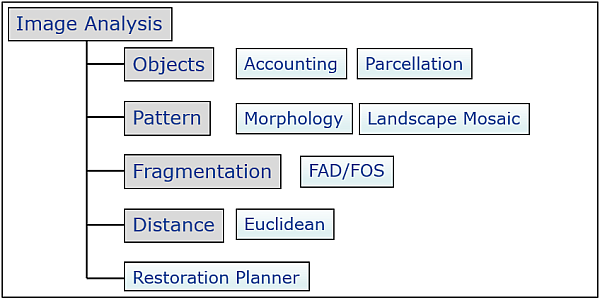
The image below shows a subset of image analysis modules in GuidosToolbox (more information can be found in the GuidosToolbox Manual). Please click on any of the light-blue rectangles to open the respective product sheet:
GTB Training:
Please check out the training material:

Feature summary:
Details on GTB are summarized in the workshop presentation GWS3, the GuidosToolbox Manual, or click on the icons below to view the GuidosToolbox
reference paper or download the overview presentation (pptx or small-size pdf).

GTB is free and open-source software.
Using the compiled versions of GTB requires accepting the GuidosToolbox End User Licence Agreement: EULA. The open source code of GTB and all dependencies is released under GPL version 3 on GitHub. GTB is available in the following options (revision history, see changelog):
1. GTB: GuidosToolbox - Desktop Application (current version: 3.3 Revision 6):
First download and read the GTB Installation instructions. They contain important additional information to ensure a correct installation and functioning of the application. Please always use the latest version to benefit from new features and bug-fixes. You can upgrade via the menu option Help → GTB Online → Check for Updates. Download and run the installer for your operating system (please use right-click - Save as and download the file to a local directory):
- Linux: system installer: Fedora, Suse, Mageia, Debian/*buntu or the generic installer
- Docker: available as a public Docker Hub image (see the Docker section in the GTB Installation), or deployed as a GTB/GWB remote desktop and GWB command-line application on CyVerse, a Docker-based cloud computing platform.
- macOS: GTB_macOS.dmg
- MS-Windows: GTB_windows.exe (or the archived, unsupported 32bit version GuidosToolbox2.7_32windows.exe)
To ensure the package integrity, compare the md5sum of your downloaded package against the GTB md5sum list.
At each start, GTB will test for and inform about new revision releases. To install a revision release, select: Help → GTB Online → Check for Updates and follow the instructions. Support will be provided for the current version only.
2. GWB: GuidosToolbox Workbench - Linux server (or desktop) application:
The GuidosToolbox Workbench (GWB) contains most popular image analysis modules extracted from GuidosToolbox and setup as commandline-only scripts for automated mass-processing on Linux 64bit servers. More information and download is available on the GWB website.
3. GWS: GuidosToolbox Workshop:
Please check out the specific training material under: GTB (Help → GTB Training).
Information on the 1-3 day GWS training course is summarized in the document GWS_Info.pdf.
The course material, composed of presentations and exercises, should be installed directly from within GTB (Help → GTB Training → GWS).
If you do not have GTB installed, you can download and browse through the pdf versions of the four workshop presentations (2024.06):
GWS1: Introduction and Motivation
GWS2: MSPA
GWS3: GTB Overview
GWS4: Training examples
The presentations provide details on the motivation, functioning and application fields of the different methodologies available in GTB. They are complemented by sample data and instructions to illustrate using these tools. The course material is designed for the 1-3 day GuidosToolbox Workshop but any interested GTB user can follow it as well.
Locations of past, upcoming, and future workshops/seminars are summarized on the GuidosToolbox Workshop page.
Note: GTB and GWB include MSPA (Morphological Spatial Pattern Analysis), a customized sequence of mathematical morphological operators targeted at the description of the geometry and connectivity of the image components. The MSPA website provides further information on MSPA features, application examples as well as links to download MSPA-plugins for GIS applications. GTB and GWB also include GraySpatCon, providing a series of moving window analysis schemes. A separate R-extension for GraySpatCon can be downloaded here.
Citation:
- GuidosToolbox is available for free at the following web site: https://forest.jrc.ec.europa.eu/en/activities/lpa/gtb/
- GuidosToolbox reference paper:
Vogt P. and Riitters K. (2017). GuidosToolbox: universal digital image object analysis. European Journal of Remote Sensing, 50, 1, pp. 352-361, doi: 10.1080/22797254.2017.1330650 - GuidosToolbox Workbench reference paper:
Vogt P. et al. (2022). GuidosToolbox Workbench: spatial analysis of raster maps for ecological applications, Ecography, Volume 2022, Issue 3, doi: 10.1111/ecog.05864 - If you use MSPA in your work, please add the following reference:
Soille P. and Vogt P. (2009). Morphological segmentation of binary patterns. Pattern Recognition Letters 30, 4:456-459, doi: 10.1016/j.patrec.2008.10.015 - Soille P. and Vogt P. (2022). Morphological spatial pattern analysis: open source release. Int. Arch. Photogramm. Remote Sens. Spatial Inf. Sci., XLVIII-4/W1-2022, 427–433, doi: 10.5194/isprs-archives-XLVIII-4-W1-2022-427-2022
- GuidosToolbox End User License Agreement (EULA)
- Please also send us a copy of your publication in which this software has been used.
Key features of version 3.3:
- Accounting in up to six object size class categories
- Custom-scale and multi-scale fragmentation analysis
- Measure ecosystem coherence
- Evaluate efficiency of restoration planning
- Grouping of resulting range into small/medium/large
- Recoding of image classes and much more...
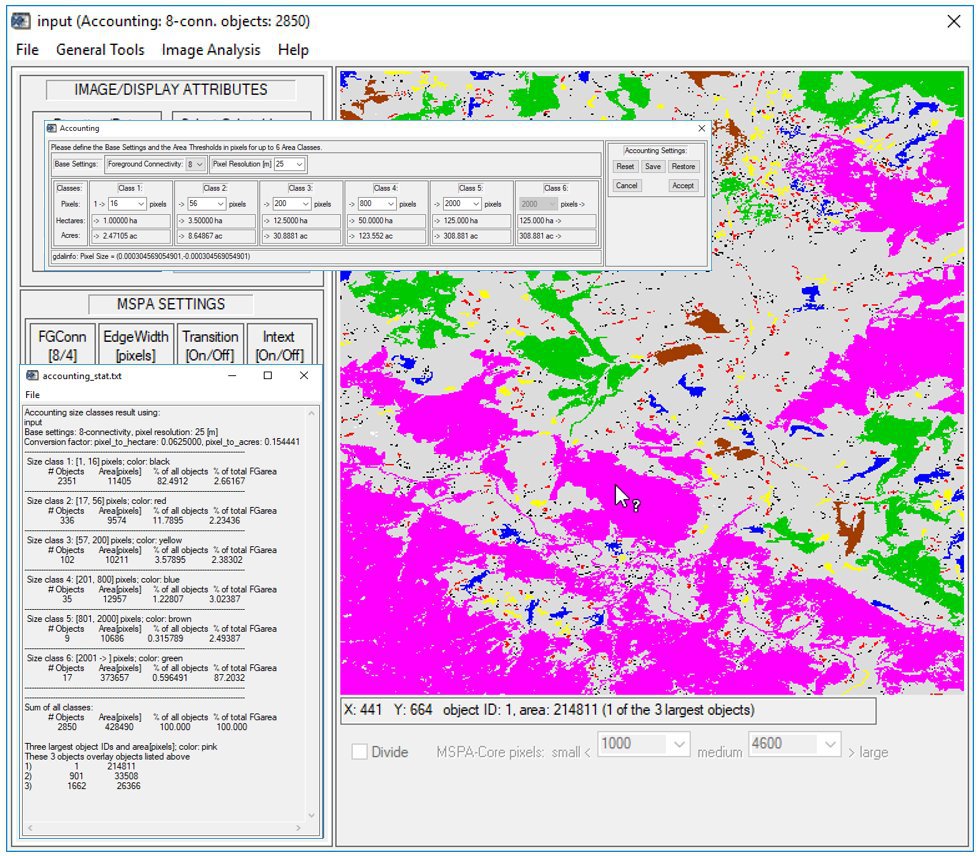
1) Accounting: How much forest do we have? Where and how large are the forest patches? Visualization and statistics of image objects in up to six user-selected area categories plus three largest objects (pink).
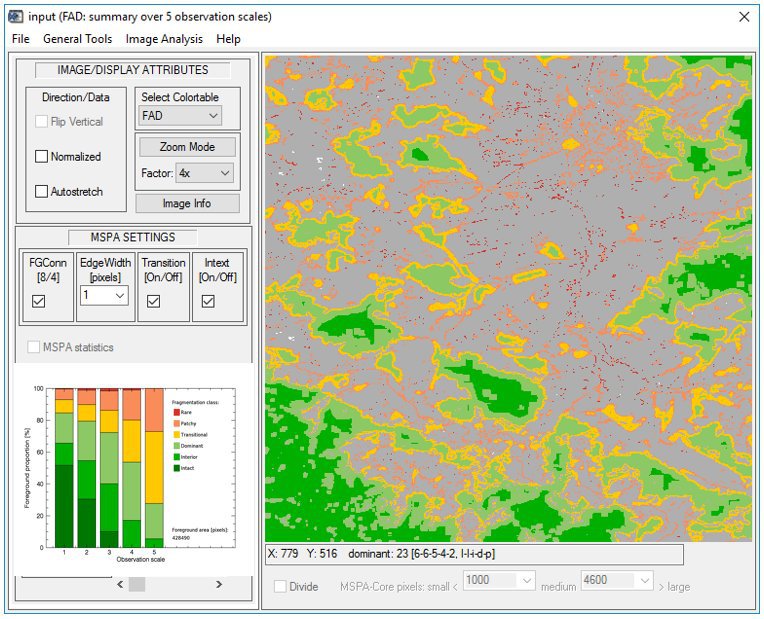
2) Fragmentation - FAD: Where and how much fragmented is the forest cover? How does the degree of fragmentation change over different observation scales? Fragmentation analysis over 5 observation scales and providing 6 classes of fragmentation: Intact, Interior, Dominant, Transitional, Patchy and Rare foreground cover.
3) Forest connectivity change: Where and how much has forest connectivity changed? Where do we have forest gain and loss? Show the forest connectivity change histogram and provide detailed change analysis in area and percent? Forest connectivity change analysis colorcoded into 7 categories and highly detailed change statistics.

4) Restoration Planner: Which is the most efficient way to go from A to B? Automatically detect optimum restoration paths between user-selectable objects. Measure expense for restoration effort and assess the overall network coherence.
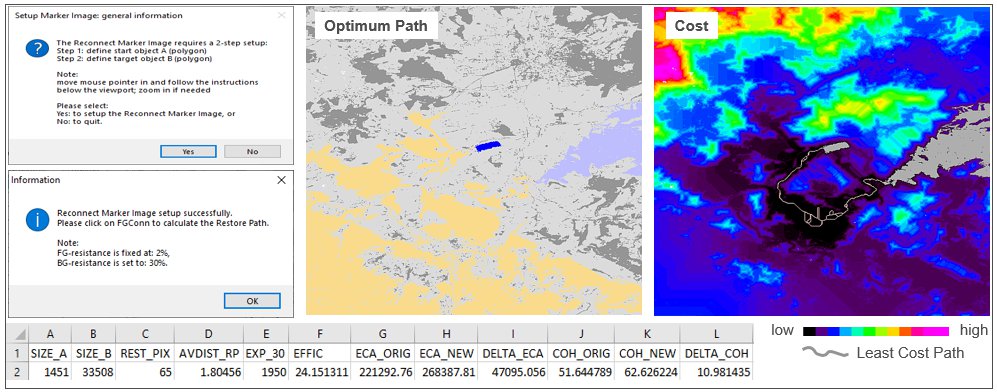
5) Restoration Planner: How efficient is a given restoration pathway? How much does it cost? How does it impact the coherence of the network? Use the Setup Tools to modify the landscape for your application needs. Insert custom shapes of habitat, blocking elements (i.e. motorways) and landcover specific resistance. Interactively add a restoration pathway to get instant feedback on expense and efficiency.
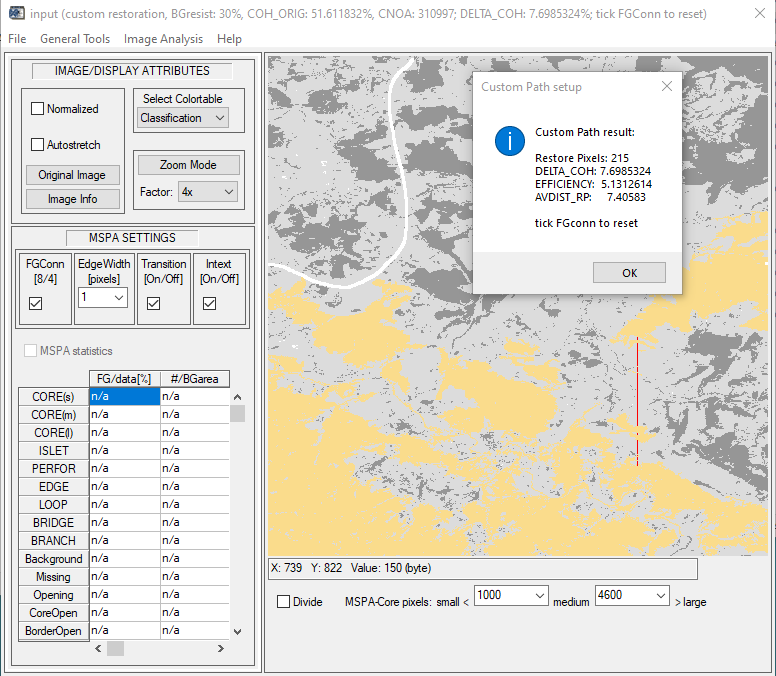
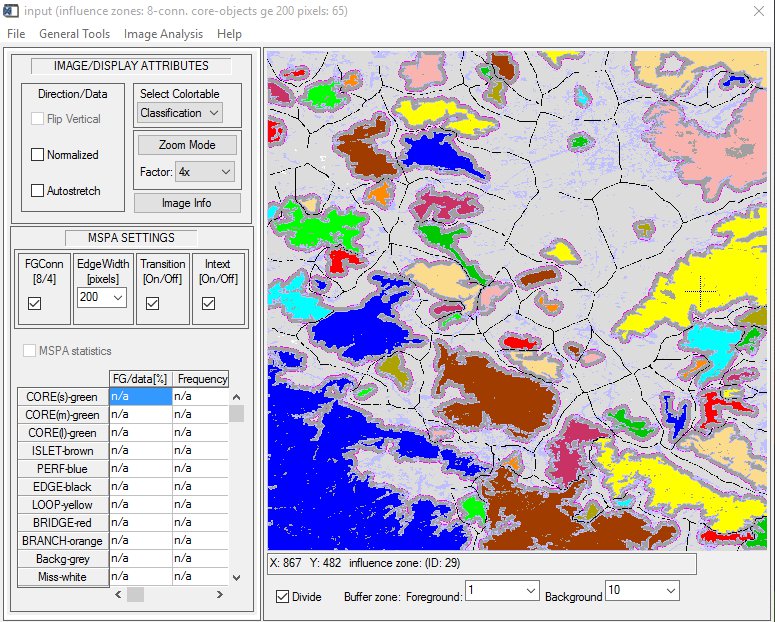
6) Distance - Influence zones: How far apart are patches from each other? Which separate patches may be functionally connected when impacted by a pest disease? Highlight core areas of minimum size and show outreach buffer zones.
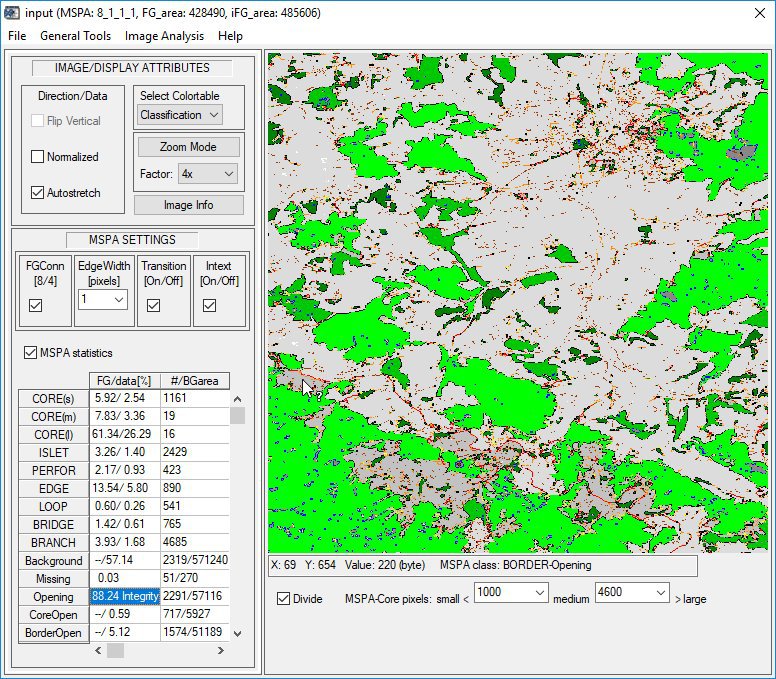
7) Pattern - MSPA: Where are isolated small fragments, core areas, connecting pathways, and holes in intact forest areas? How often do they occur and what is their area? Show spatial distribution and statistics for morphological pattern classes and different type of openings inside foreground (median-grey: border-opening, dark-grey: core-opening). The Integrity of the integral foreground is 88.24% <=> 11.76% are Openings.
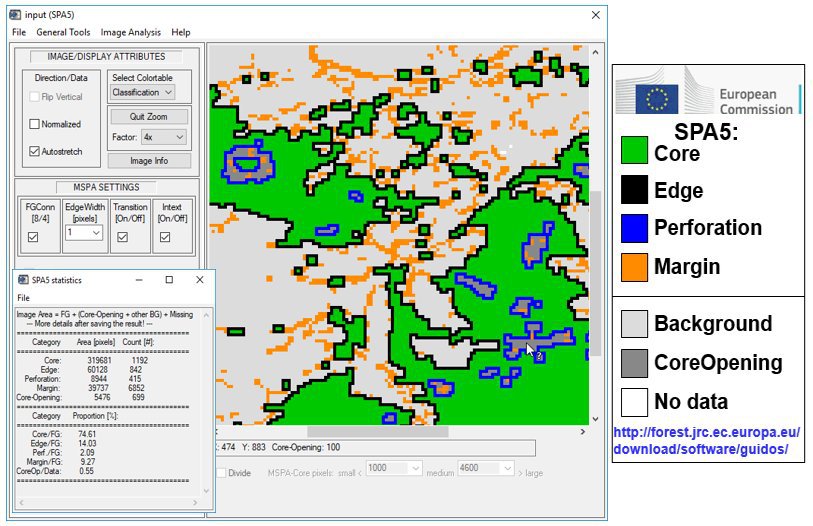
8) Pattern - SPAx: MSPA too complex? Less is more: How are the Core areas structured? Where and how many holes do we have? Use SPA3 to focus on Core area and Core-Openings; SPA5 to further distinguish inside and outside Core-boundaries; or SPA6 to additionally detect small fragments. Use MSPA for more elaborate analysis.
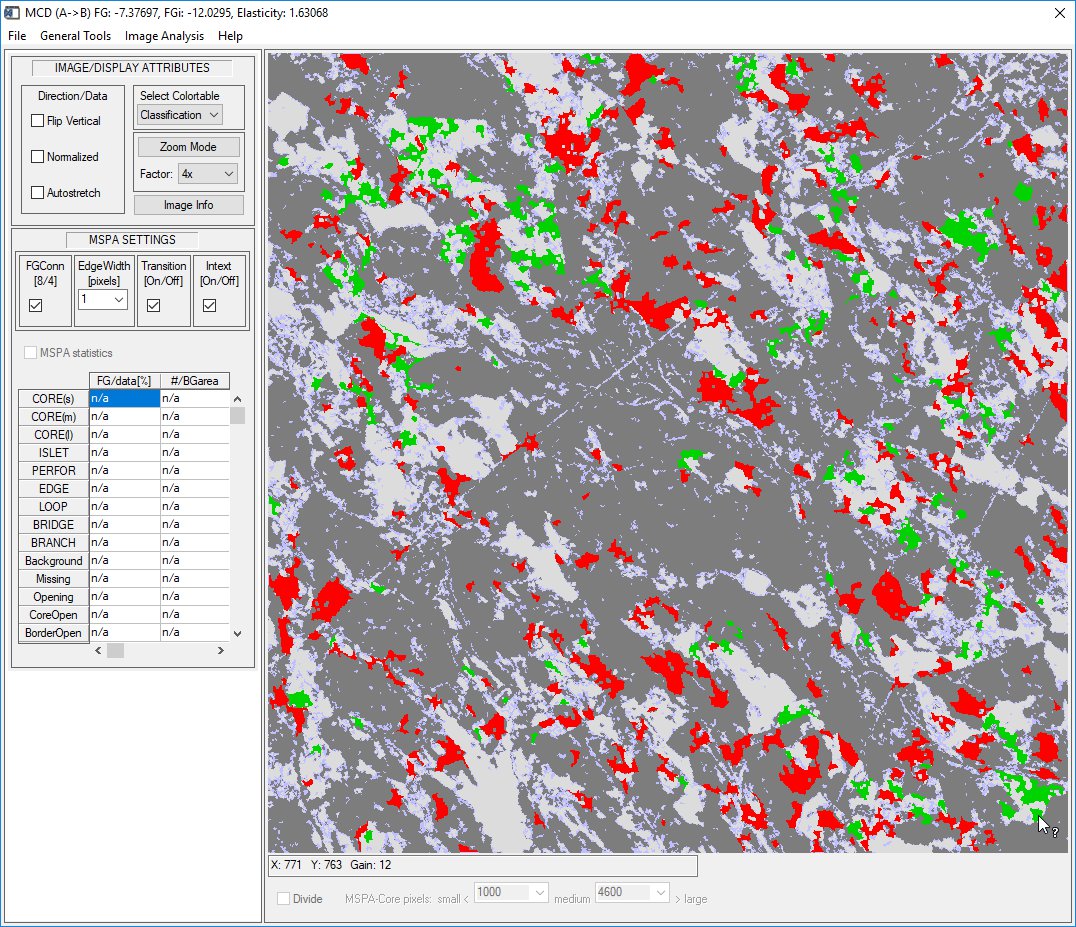
9) Change - Morphological Change Detection (MCD): Can you remove the spurious changes and show the essential change areas only? MCD showing gain, loss, unchanged foreground (dark) and background (light).
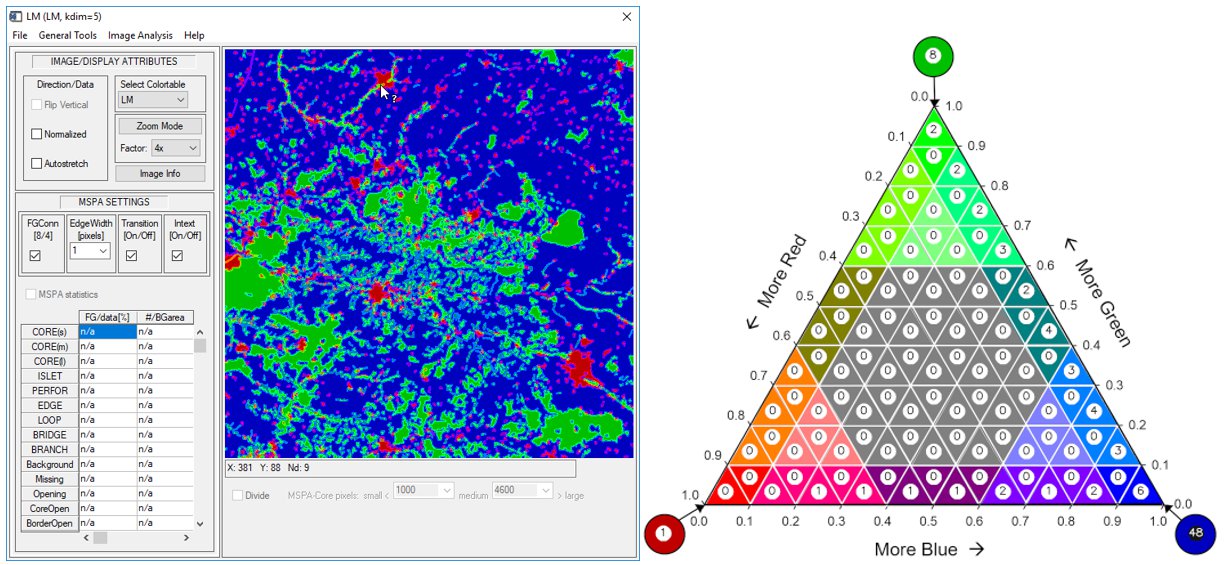
10) Landscape Mosaic: Which land cover type is dominant in which part of the landscape? Where do we find homogeneous land cover and where a strong intermix of different land cover types? Left: Showing for each pixel the relative proportions of 3 classes (here: Agriculture, Natural, Developed) at a user-selectable observation scale. Right: The heatmap summary showing the relative pixel occurence frequency in each mosaic category.
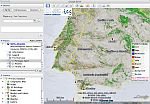
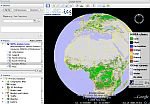
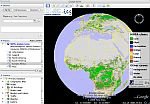
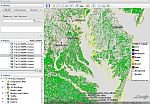
11) Google Earth overlays: Export/save your results as Google Earth image overlays. Click any of the maps below to open them in Google Earth on your PC:
|
|
|
|
| MSPA EU 2000, 25m | MSPA EU 2006, 25m | Global 2005, 300m | Global 2009, 300m |
|
|
|
|
| Forest, US 2001, 30m | Forest EU 2000, 25m | Forest EU 2006, 25m | Forest type EU 2006, 25m |
Instructions: Make sure you have Google Earth (version 4 or higher) installed or download and install the latest version here. Click on the overlay of interest and select 'Open with Google Earth' in the popup window. Alternatively, right-click one of the links below and save the kmz-file to your PC. Then double-click this file, or right-click and select: 'Open with Google Earth', or drag and drop this file over Google Earth.
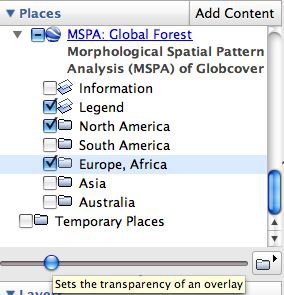
Important: For proper display in Google Earth ensure that in
Google Earth: Tools --> Options --> 3D View --> Texture Colors, the Compress option is unchecked,
then restart Google Earth. Please read and follow the instructions in the initial Information window.
Then in the Panel section (left side in Google Earth):
Note: the transparency of the image overlay is only |
|
Contact: peter.vogt[at]ec.europa.eu